Disclaimer :
First, this post is obvioulsy not about Android, but rather on google+.
Next, Google Plus is my social network of choice.
I hardly read Facebook, and I'm a passive user of twitter (ie I read there, but never write any message ).
So I'm essentially using Google Plus. I almost exclusively have a quasi professional use : as a vector to read and participate to news I'm interested in, techno geek things : game development, development in general, Android, web development, ...
The promise of Google plus :
I was interested in G+ for one main reason : the circles.
I always wanted to behave differently depending on the people I'm with.
I won't have the same conversations with work friends, school friends, family, hobbies friends...
So I don't want to share the same things with all these different people.
That's why I was so interested in G+, the possibity to have different circles, and to choose who I want to share my messages with.
Reality Check :
I've been using G+ for 2 years, and I'm not really using it as I wanted.
Actually, as I already said, I'm using it exclusively for technology things.
I don't use it at all for my family, for my friends, for anything else...
Even worst : I advice my friends and family NOT to follow me !
Why ?
Because, I'm quite active on G+, posting more than one post a day, on technology subjects, and publicly shared.
If my friends and family followed me, they would be spammed with post on C++, Unity3D, and Android that they would obvioulsy not understand, and not be interested in.
So in order to protect them, I prefer them not to follow me !
Actually, G+ is useful only if you only have one point of interest, if you only want to show one face to your audience.
Where is the promise ? You can read on G+ website :
"Circles make it easy to share the right things with the right people, just like in real life".
This just becomes untrue once you start sharing publicly.
Workarounds :
I'm obviously not the only one with this issue, so how are people dealing with this problem :
Just posting on several subjects, and let your audience read only what they interested in :
For instance I'm following Romain Guy, a former Android developer. But half of his posts are about his passion for photography. Hopefully, he is not spamming with messages, so it's okay ( and he posts great photos :) ), but that's not what I was interested in in the first time.
It's surely not a good solution if you post a lot, and care about your audience.
Posting in private :
That's a possibility that a lot of people are using : when people connect to your profile, ask them what they are interested in, put them in the associated circle(s), and only post in private for specific circles.
The issue here is that privately shared post can't be reshared and they can be read by people that are not in your circle.
So it lowers your visibility on G+, and creates some artifical barriers in the information diffusion.
Having several accounts :
One can create an account for techno things, one account for family, one account for friends.
But it sounds like a painful thing to keep on changing account every now and then, as our google account is now central in our web experience ( as we're using Chrome / gmail / G+ / Android Phones / ... )
And I think it's forbidden by Google Term of use.
Solutions ?
I'm not here to explain google guys how to do their jobs, and I do completely understand it's not an easy problem.
To be efficient, G+ should be as accessible as possible, and I'm sure any solution would add complexity.
But I feel like something like "public circles" should be possible.
Current circles are a perfectly good solution, but they only work for private posts.
So why not create some public circles, and let your audience choose which public circles they want to subscribe to ?
I'm sure Google have a lot of talented UX specialists that can come with a better solution, my point is still that I can't use G+ as much as I would like to.
As G+ is becoming more and more important for Google and for the user experience, it may be important to find a solution for this problem.
( Also Posted on G+ )
Sunday, April 27, 2014


Sunday, August 12, 2012
Android Activity Wizard : please let me create a simple activity !
Today, I wanted to create a new activity in my next application...
Nothing really strange for now...
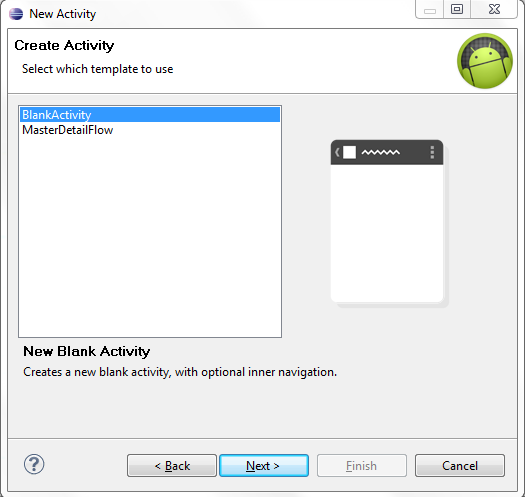
So I tried the new Activity wizard to create a very simple activity ( it's just to play a video, so I don't even want an action bar ) :
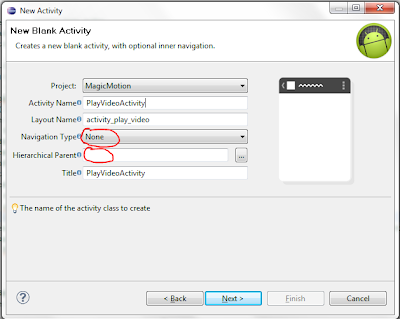
Then I choose not to use any navigation option :
And Taadaaa !!
It just failed :

Note that I've installed the latest support library version ( 9 ), and restarted Eclipse :

But no, it won't let me create a new activity :(
It's no big deal as I can still create it manually, but I was expecting more support from this wizard :)
Nothing really strange for now...
So I tried the new Activity wizard to create a very simple activity ( it's just to play a video, so I don't even want an action bar ) :
Then I choose not to use any navigation option :
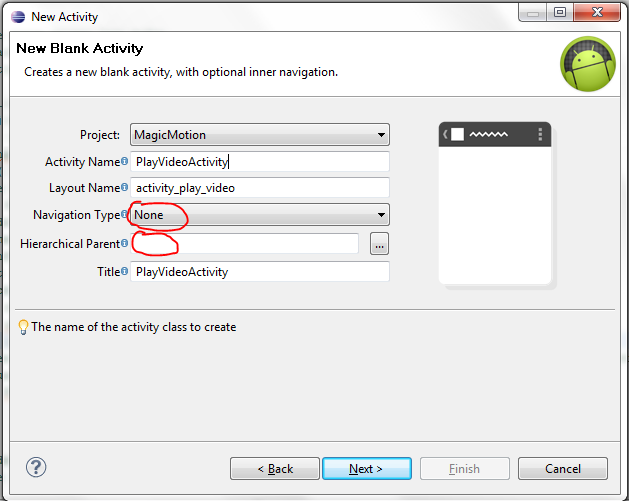
And Taadaaa !!
It just failed :
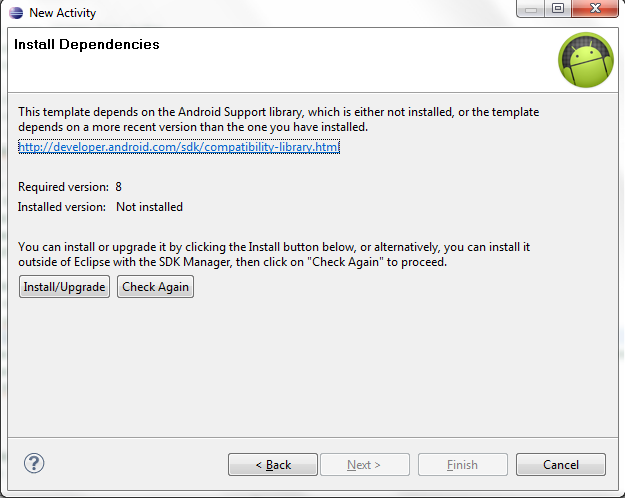
Note that I've installed the latest support library version ( 9 ), and restarted Eclipse :
But no, it won't let me create a new activity :(
It's no big deal as I can still create it manually, but I was expecting more support from this wizard :)
Saturday, June 23, 2012
What's wrong with Search in Google Play
What's wrong with the search in Google Play ?
Yesterday, I was looking for something in my sliding tile puzzle called 'Nature Puzzle'.
So I opened Google Play website, and started with a search for 'Nature Puzzle'.
Here is the result :

We have :
* Photo Puzzle Game, NumberPuzzle,
* Nature Puzzles,
* Nature Puzzle,
* Natural Seasons,
* Zoo and Nature Puzzle 2 in 1
* kids Puzzle:Animal
and my game is not listed !
What I don't understand is that I gave the exact name, and I didn't find it !
I looked at the last app (kids Puzzle Animal ) more closely, and there is only 1 occurence of 'natural' in the description.
And the application called 'Nature Puzzle' ( so with the exact same name as mine ), it has the same rating, and less downloads.
Note that
* I'm not complaining here that my application does not have enough visibility : I only published it as a proof of concept of Html5 android applications
* I'm not asking the description of the search algorithms in the Google Play Store !
I'm just amazed that, from a customer point of view, giving the exact name of an application does not bring this application to the top !
Actually, if I specify that I want to search only in Android apps, then my game appears at the 7th rank :
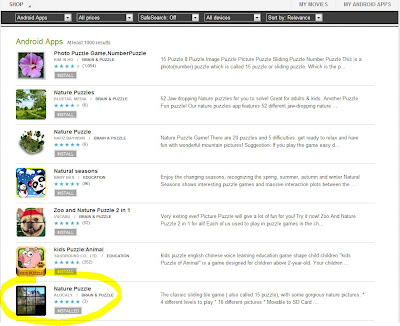
I even discovered another application named 'Nature Puzzle' ( it now sounds like a very common name ), that is even more badly ranked than mine !
Am I the only one to found it strange ?
Do you feel like there are some reasons, for the customer, not to put the application with the exact name first in the search results ?
Do you understand how the ranking is done ?
Yesterday, I was looking for something in my sliding tile puzzle called 'Nature Puzzle'.
So I opened Google Play website, and started with a search for 'Nature Puzzle'.
Here is the result :

We have :
* Photo Puzzle Game, NumberPuzzle,
* Nature Puzzles,
* Nature Puzzle,
* Natural Seasons,
* Zoo and Nature Puzzle 2 in 1
* kids Puzzle:Animal
and my game is not listed !
What I don't understand is that I gave the exact name, and I didn't find it !
I looked at the last app (kids Puzzle Animal ) more closely, and there is only 1 occurence of 'natural' in the description.
And the application called 'Nature Puzzle' ( so with the exact same name as mine ), it has the same rating, and less downloads.
Note that
* I'm not complaining here that my application does not have enough visibility : I only published it as a proof of concept of Html5 android applications
* I'm not asking the description of the search algorithms in the Google Play Store !
I'm just amazed that, from a customer point of view, giving the exact name of an application does not bring this application to the top !
Actually, if I specify that I want to search only in Android apps, then my game appears at the 7th rank :

I even discovered another application named 'Nature Puzzle' ( it now sounds like a very common name ), that is even more badly ranked than mine !
Am I the only one to found it strange ?
Do you feel like there are some reasons, for the customer, not to put the application with the exact name first in the search results ?
Do you understand how the ranking is done ?
Sunday, May 13, 2012
Ghost Recon Future Soldier
It's been a long time since my last update on this blog.
Actually, my Android's developments are only hobby projects. My real job is working on console video games.
And we've just finished Ghost Recon Future Soldier !
I was very busy finishing the game, so I couldn't really post any more.

But the game is now done, I am really proud of it, the whole team has done an amazing job, so I will now be able to return to more Android developments !
During this time, I could port my 'Word Prospector' game on the Blackberry Playbook, and I started a new project.
More on all this later :)
Now I just want to enjoy the Ghost Recon Future Soldier launch.
Actually, my Android's developments are only hobby projects. My real job is working on console video games.
And we've just finished Ghost Recon Future Soldier !
I was very busy finishing the game, so I couldn't really post any more.

But the game is now done, I am really proud of it, the whole team has done an amazing job, so I will now be able to return to more Android developments !
During this time, I could port my 'Word Prospector' game on the Blackberry Playbook, and I started a new project.
More on all this later :)
Now I just want to enjoy the Ghost Recon Future Soldier launch.
Monday, August 8, 2011
Orientation for both phones and tablets
Tablets are now a new component to take into account when programming applications on Android.
And it brings issues with your application orientation...
My game Word Prospector was meant to be played in portrait mode on a phone.
But on tablets, I want it to be played in landscape ( as it feels more natural for tablets ).
But how to achieve that ?
Activity orientation is fixed in the manifest, and you can't have different manifests for different screen configurations.
So how to manage that ?
I found three different ways...
First solution : different apk for different screen configurations
Now that the Android market gives us support for multiple apk, ( see here ), you can use it just to have some differences in the manifest.
So you can have the very same application and only have different orientations in the manifest, and let the market make the work for you.
But having several apk is painful for developers : it's a lot of work to develop, and to maintain.
So I would not recommend this solution.
Second Solution : have some activity code to manage the orientation
You can impose the orientation of your activity in the onCreate method of the activity, with the setRequestedOrientation( ActivityInfo.SCREEN_ORIENTATION_XXX ) function.
So you can have some code like this :
With this code, when there is an orientation change, the activity is destroyed, then re created.
To avoid this destruction / recreation step, that would break the smoothness of the user experience, you have to disconnect the destruction of the activity mechanism.
So you have to add a
android:configChanges="keyboardHidden|orientation"
parameter in the activity declaration in the manifest, and add an empty onConfigurationChanged method.
Now you can even be more flexible.
If you want one configuration ( for instance the tablet one ) to handle both orientation, and the other ( the smartphone ) to handle only one orientation, you can do it :
In the OnCreate method, impose the orientation only for the smartphone :
Then in the onConfigurationChanged, you have to recreate the Activity only when on tablet. And in this case, you have to save the activty state, and restore it, as the classic destruction / creation of the activity is deactivated :
Third solution : let's get back to the manifest...
The manifest really is the tool Android developers gave us to handle the orientation...
So my last ( and prefered ) solution is to have two different activities, with different orientation capacities :
Then you just have to choose what activity to launch in the caller activity :
And my turn to ask a question :
How can we easily implement an isXLargeScreen method ? ( my current implementation is something I'm really proud of :) )
And it brings issues with your application orientation...
My game Word Prospector was meant to be played in portrait mode on a phone.
But on tablets, I want it to be played in landscape ( as it feels more natural for tablets ).
But how to achieve that ?
Activity orientation is fixed in the manifest, and you can't have different manifests for different screen configurations.
So how to manage that ?
I found three different ways...
First solution : different apk for different screen configurations
Now that the Android market gives us support for multiple apk, ( see here ), you can use it just to have some differences in the manifest.
So you can have the very same application and only have different orientations in the manifest, and let the market make the work for you.
But having several apk is painful for developers : it's a lot of work to develop, and to maintain.
So I would not recommend this solution.
Second Solution : have some activity code to manage the orientation
You can impose the orientation of your activity in the onCreate method of the activity, with the setRequestedOrientation( ActivityInfo.SCREEN_ORIENTATION_XXX ) function.
So you can have some code like this :
if ( isXLargeScreen() )
    setRequestedOrientation(ActivityInfo.SCREEN_ORIENTATION_LANDSCAPE);
else
    setRequestedOrientation(ActivityInfo.SCREEN_ORIENTATION_PORTRAIT);
With this code, when there is an orientation change, the activity is destroyed, then re created.
To avoid this destruction / recreation step, that would break the smoothness of the user experience, you have to disconnect the destruction of the activity mechanism.
So you have to add a
android:configChanges="keyboardHidden|orientation"
parameter in the activity declaration in the manifest, and add an empty onConfigurationChanged method.
Now you can even be more flexible.
If you want one configuration ( for instance the tablet one ) to handle both orientation, and the other ( the smartphone ) to handle only one orientation, you can do it :
In the OnCreate method, impose the orientation only for the smartphone :
if ( ! isXLargeScreen() )
    setRequestedOrientation(ActivityInfo.SCREEN_ORIENTATION_PORTRAIT);
Then in the onConfigurationChanged, you have to recreate the Activity only when on tablet. And in this case, you have to save the activty state, and restore it, as the classic destruction / creation of the activity is deactivated :
    public void onConfigurationChanged (Configuration newConfig)
    {
        //Log.d("tag", "config changed");
        super.onConfigurationChanged(newConfig);

        if ( ! isXLargeScreen() )
            return;

        // CODE FOR ROTATION
        // FOR BIGSCREENS :
        SaveActivityState();
        setContentView( R.layout.MyActivity );
        RestoreActivityState();
    }
Third solution : let's get back to the manifest...
The manifest really is the tool Android developers gave us to handle the orientation...
So my last ( and prefered ) solution is to have two different activities, with different orientation capacities :
        <activity     android:name="LetterGame"
                    android:screenOrientation="portrait"
                    android:configChanges="keyboardHidden|orientation"
                      android:label="@string/app_name">
        </activity>
        <activity     android:name="LetterGameLandscape"
                    android:configChanges="keyboardHidden|orientation"
                    android:screenOrientation="landscape"
                      android:label="@string/app_name">
        </activity>
and to create a MyActivityLandscape class, that just do ... nothing !
It just inherits from MyActivity :
package com.alocaly.LetterGame;
public class MyActivityLandscape extends MyActivity
{
}
Then you just have to choose what activity to launch in the caller activity :
Intent i;
if ( isXLargeScreen() )
    i = new Intent(MainMenu.this, MyActivityLandscape.class);
else
    i = new Intent(MainMenu.this, MyActivity.class);
startActivity( i );
And that's it !!
The onConfigurationChanged function should still be empty, or you can specialize it for your second activity.
Do you see another technique to handle different orientations with different devices ?
And my turn to ask a question :
How can we easily implement an isXLargeScreen method ? ( my current implementation is something I'm really proud of :) )
Thursday, June 2, 2011
An Android Application in HTML5
Hi all,
After my Blackberry / Html5 pause ( see here ) , I decided to port the games I made in Html5 on android.
So the first one is there now : it's called Nature Puzzle, and it's a simple sliding puzzle.
I will soon write another post on this development on android with Html5, but at least, it's here and feasible.
And if some people are interested, I will perhaps open source this simple game...
Although it's a very simple game, the pieces move is not totally smooth on my G1, but on my Nexus One, it's nice.
I will soon try the second blackberry game I made, that was more demanding...
Here is the link
Nature Puzzle on Android Market
And some screenshots :


After my Blackberry / Html5 pause ( see here ) , I decided to port the games I made in Html5 on android.
So the first one is there now : it's called Nature Puzzle, and it's a simple sliding puzzle.
I will soon write another post on this development on android with Html5, but at least, it's here and feasible.
And if some people are interested, I will perhaps open source this simple game...
Although it's a very simple game, the pieces move is not totally smooth on my G1, but on my Nexus One, it's nice.
I will soon try the second blackberry game I made, that was more demanding...
Here is the link
Nature Puzzle on Android Market
And some screenshots :


Sunday, April 17, 2011
The blackberry pause
I have to confess it : I made a small pause in my Android development.
During one month, I developped for the Blackberry Playbook, and it was a rather pleasant experience !
Actually, it started when I read this blog entry from James Becwar.
Blackberry offered a free Blackberry Playbook ( their incoming tablet ) if you developped a application for it.
This was a very tempting offer, so I decided to jump into this challenge !
The challenge :
Actually, the challenge was that I read this blog entry on the 26th of February, and you had to submit your application before the 15th of March...
I only had about 15 days to learn a new language, a new platform, a new submission process, and to develop my application.
All that, while still having to manage my real job, my kids, my wife, my friends...
On top of this, a friend proposed me at the very same time to play a 'Neptune's Pride' play. "Neptune's pride" is a nice strategy online game, that played over 2 to 3 weeks. The things is when the game starts, you only have 4 units, so everyday it takes about 10 minutes to play. But the game quickly becomes more challenging, and more time consuming. Way too much for me ! But I couldn't make myself reasonable, and give up. So I played until the end ( I even won the match :) ! ).
Developping for the Blackberry Playbook :
So I decided to start to develop for the Playbook.
There are two ways one can develop for the playbook :
- Using Adobe Air
- Using Html5
I decided to go the Html5 way : it is free ( I could use an evaluation version for Adobe Air, but I prefer to learn something that I will use as much as I want ), and I feel like learning Html5 can always be a good thing, for my work, for my android development, for some personal Web develpment, etc...
The tools to develop for the Playbook :
The playbook comes with an SDK, and an emulator that really is a virtual Machine running under VmWare.
Considering the short time I had to develop my application, I decided to stay as far away as possible from the device specific issues, so I decided to choose an application as simple as possible, and that I could develop as much as possible with Chrome.
So I didn't wanted to write files, to use the camera, to use the GPS, or anything like that.
I just wanted to develop in Chrome, and check every day that my development was still working in the emulator.
So the application I chose to develop that a simple sliding puzzle ( also called the 15 puzzle ). Nothing really exciting, but something I really could finish in such a small amount of time.
Developping in Html5
So I started developping in Html5, with Chrome.
Html5 is some Html, css, and javascript.
In my, case, I just took a canvas ( ie a part of the Html page ), and entirely control it in Javascript, from the event response to the display.
So I didn't use the Css at all, I merely used the Html part to create the canvas. So quite all of my development were in javascript.
And to be honest, I was really impressed by this way of developping.
The 'iteration Cycle' - ie the time it takes to make a change in your code, and to check its effects in your application - is really low : you modify your javascript code, and just press F5 in your chrome browser, and voila ! It's done...
It's much better than developping for Android, where the installation phase on the emulator or the real device, and even the compilation phase, for a big application, takes some time.
Chrome contains a full debugger, so tracing a bug is quite easy, and you can even hot change the code !
It also contains some profiling tools, and some tools to monitor the memory usage.
Actually, I was impressed by all the stuff that were in chrome. I only had used it as a (fast) browser, and now I found it was also a valuable develoment environment !!
Obviously, everything is not that easy in the Html5 development world :
Javascript is a strange language:
* not really object ( there is no real inheritance ),
* Actually even creating an object is an strange thing : you create it as a special function !
* sometimes Javascript is not strict enough : if you forget to define a variable as a new one, local to your function ( with the 'var' keyword ), it will use whatever var with the same name it can find in the namespace ( like a global one, or worth, one coming from a caller function ), creating some strange bugs...
* the counterpart of all this strangeness is that javascript is a very flexible langage, so can do crazy things like modifying some methods of an instance of an object at runtime. ( at least for a C++ developper, this is a very crazy thing )
* Chrome optimizes the javascript code, so sometimes, it's hard to debug : the code won't stop at some lines that are actually really executed !
* Chrome is a real development environment, but I still prefer my Visual Studio environment !!!
Developping for the Playbook added some specificities :
* For some reasons, I wanted to use more html5 feature than just using my canvas, and failed. Something as simple as calling specific javascript code with clicking a link didn't work. I didn't investigate, and just put everything in my canvas !
* A lot of features just didn't work, in the real device or in the emulator ( and I don't feel like releasing something without any test ) : sound, videos, orientation support, ...
* The event for managing the touchscreen are a little different from the events for managing the mouse. Nothing really big, but enough to bring me some bugs...
Conclusion :
All in all I was really happy with these development. Actually I manage to create my application in 15 days. At this time, the limit had been postponed to the 31th of March, so I ended up developping another application ( to be honest, I was a little ashamed to only deliver such a simple application as a sliding puzzle ), so I created a coloring game for child, in the next 15 days.
I enjoyed doing these two developments, and could finished them by the deadline.
Some time ago, with some friends from work, we made a kind of context where we were to create a little game prototype during our launch pause. So we only had 1 hour and half to create this prototype.
Actually, I like the idea of developping something as fast as possible.

The sliding puzzle :

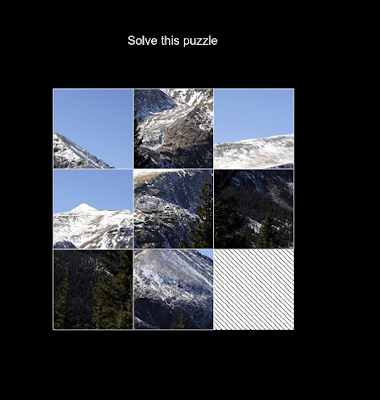
During one month, I developped for the Blackberry Playbook, and it was a rather pleasant experience !
Actually, it started when I read this blog entry from James Becwar.
Blackberry offered a free Blackberry Playbook ( their incoming tablet ) if you developped a application for it.
This was a very tempting offer, so I decided to jump into this challenge !
The challenge :
Actually, the challenge was that I read this blog entry on the 26th of February, and you had to submit your application before the 15th of March...
I only had about 15 days to learn a new language, a new platform, a new submission process, and to develop my application.
All that, while still having to manage my real job, my kids, my wife, my friends...
On top of this, a friend proposed me at the very same time to play a 'Neptune's Pride' play. "Neptune's pride" is a nice strategy online game, that played over 2 to 3 weeks. The things is when the game starts, you only have 4 units, so everyday it takes about 10 minutes to play. But the game quickly becomes more challenging, and more time consuming. Way too much for me ! But I couldn't make myself reasonable, and give up. So I played until the end ( I even won the match :) ! ).
Developping for the Blackberry Playbook :
So I decided to start to develop for the Playbook.
There are two ways one can develop for the playbook :
- Using Adobe Air
- Using Html5
I decided to go the Html5 way : it is free ( I could use an evaluation version for Adobe Air, but I prefer to learn something that I will use as much as I want ), and I feel like learning Html5 can always be a good thing, for my work, for my android development, for some personal Web develpment, etc...
The tools to develop for the Playbook :
The playbook comes with an SDK, and an emulator that really is a virtual Machine running under VmWare.
Considering the short time I had to develop my application, I decided to stay as far away as possible from the device specific issues, so I decided to choose an application as simple as possible, and that I could develop as much as possible with Chrome.
So I didn't wanted to write files, to use the camera, to use the GPS, or anything like that.
I just wanted to develop in Chrome, and check every day that my development was still working in the emulator.
So the application I chose to develop that a simple sliding puzzle ( also called the 15 puzzle ). Nothing really exciting, but something I really could finish in such a small amount of time.
Developping in Html5
So I started developping in Html5, with Chrome.
Html5 is some Html, css, and javascript.
In my, case, I just took a canvas ( ie a part of the Html page ), and entirely control it in Javascript, from the event response to the display.
So I didn't use the Css at all, I merely used the Html part to create the canvas. So quite all of my development were in javascript.
And to be honest, I was really impressed by this way of developping.
The 'iteration Cycle' - ie the time it takes to make a change in your code, and to check its effects in your application - is really low : you modify your javascript code, and just press F5 in your chrome browser, and voila ! It's done...
It's much better than developping for Android, where the installation phase on the emulator or the real device, and even the compilation phase, for a big application, takes some time.
Chrome contains a full debugger, so tracing a bug is quite easy, and you can even hot change the code !
It also contains some profiling tools, and some tools to monitor the memory usage.
Actually, I was impressed by all the stuff that were in chrome. I only had used it as a (fast) browser, and now I found it was also a valuable develoment environment !!
Obviously, everything is not that easy in the Html5 development world :
Javascript is a strange language:
* not really object ( there is no real inheritance ),
* Actually even creating an object is an strange thing : you create it as a special function !
* sometimes Javascript is not strict enough : if you forget to define a variable as a new one, local to your function ( with the 'var' keyword ), it will use whatever var with the same name it can find in the namespace ( like a global one, or worth, one coming from a caller function ), creating some strange bugs...
* the counterpart of all this strangeness is that javascript is a very flexible langage, so can do crazy things like modifying some methods of an instance of an object at runtime. ( at least for a C++ developper, this is a very crazy thing )
* Chrome optimizes the javascript code, so sometimes, it's hard to debug : the code won't stop at some lines that are actually really executed !
* Chrome is a real development environment, but I still prefer my Visual Studio environment !!!
Developping for the Playbook added some specificities :
* For some reasons, I wanted to use more html5 feature than just using my canvas, and failed. Something as simple as calling specific javascript code with clicking a link didn't work. I didn't investigate, and just put everything in my canvas !
* A lot of features just didn't work, in the real device or in the emulator ( and I don't feel like releasing something without any test ) : sound, videos, orientation support, ...
* The event for managing the touchscreen are a little different from the events for managing the mouse. Nothing really big, but enough to bring me some bugs...
Conclusion :
All in all I was really happy with these development. Actually I manage to create my application in 15 days. At this time, the limit had been postponed to the 31th of March, so I ended up developping another application ( to be honest, I was a little ashamed to only deliver such a simple application as a sliding puzzle ), so I created a coloring game for child, in the next 15 days.
I enjoyed doing these two developments, and could finished them by the deadline.
Some time ago, with some friends from work, we made a kind of context where we were to create a little game prototype during our launch pause. So we only had 1 hour and half to create this prototype.
Actually, I like the idea of developping something as fast as possible.
I would like to do it again, all by myself : to give me the constraint to create a little game in 15 days ( or at least a good prototype ). I always found that some good things were coming from this challenges.
As for the result application, they are some applications I still can be proud of.
Actually, my older kid likes the sliding game, and both my kids like the coloring game. This is, in my opinion, a really good sign !!!
Now, as this is essentially a Android blog, let's talk a little about more robotic things.
Now that I have two Html5 applications, I will try to port them to Android, and check how easy it it.
Actually, I would like to check if developping directly in Html5 is a viable option for Android, but I really have some big hopes in this area !!
Here are the applications :
The coloring game :


The sliding puzzle :


And here are the link to the application for the Blacberry owners that are lost on this Android development blog :
Sunday, April 10, 2011
Word Prospector on Win7 phones !!
Word Prospector is now also on Win7 phones !
Sebastien, a very talented game programmer fellow, has ported it on win7.
Actually, he recoded from scrach, and the result is really nice.
It looks like developping for Win7 is really nice and easy, with Visual studio environment, and the ease of use of C# and the XNA framework.
Here are some screens of the final result :


The gameplay is the same, but the graphic design is nicer than mine (ok, it's not that difficult... I really need to do something in this area... ), with lots of fancy animations !
Wish you the best with this game, Seb !!
Sebastien, a very talented game programmer fellow, has ported it on win7.
Actually, he recoded from scrach, and the result is really nice.
It looks like developping for Win7 is really nice and easy, with Visual studio environment, and the ease of use of C# and the XNA framework.
Here are some screens of the final result :
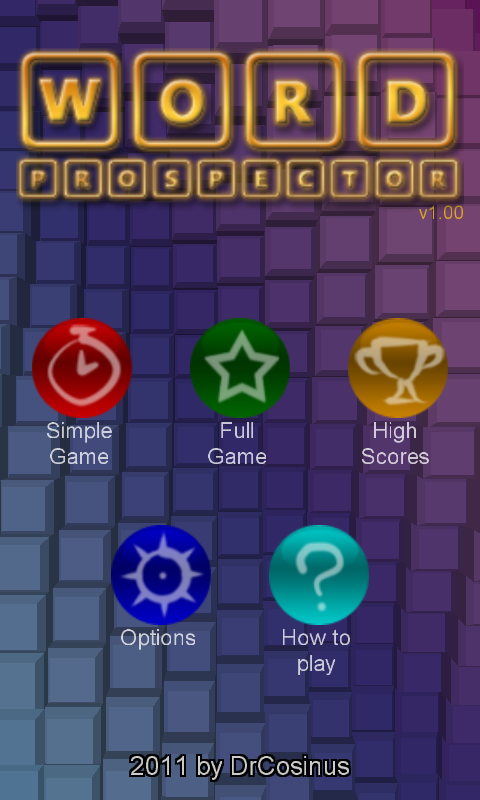
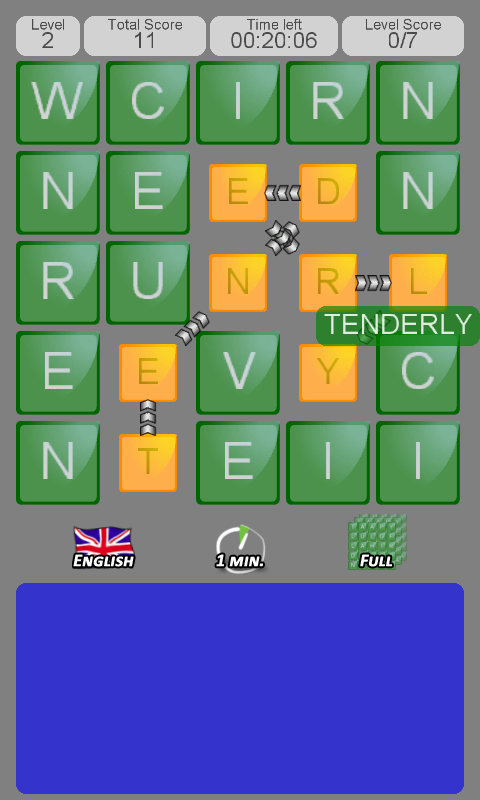
The gameplay is the same, but the graphic design is nicer than mine (ok, it's not that difficult... I really need to do something in this area... ), with lots of fancy animations !
Wish you the best with this game, Seb !!
Sunday, February 13, 2011
Instable Android, and the 'unable to open database file' bug
Hi everyone,
Welcome to this little ( and scary ) episode of my Android user life :
Yesterday, I came back from Canada. So in the plane, I turned my phone off.
And when I turned it on... It became a (little) nighmare...
I got something like a just installed Android on my phone. So I had to link the phone to my gmail account again, accept the different Terms Of Service, etc...
Ok... Not that complicated... Not the thing you want to do in the airport, that early in the morning, with not much sleep and a big jet-lag, but, it's still feasible.
Then the background had changed, and all of my shortcut and folders have vanished.
Once again, it's a little painful, but still manageable...
Then I quickly discovered that there was more than just that...
Actually, my android version is now quite bugged :
A Bugged Android :
* All the application installed on my SD card had disappeared !! There are more than one year of 'Spy My Apps' data on it, so this one IS serious. I just than I will find a way to get them back.
* the lock screen is still present, but any combinaison will unlock it !!! This one was rather funny ( at least for me ). Resetting the combinaison in the settings fixed it.
* gmail, Youtube, Google Maps were still in the old version, so I could rapidly found that I prefered the new ones ( but waiting a little get them back automagically ).
* For a reason I still can't understand, Twitter was already in the 2.0 version, but the market was unaware of that, so it tried to download and reinstall the 2.0 version, and just failed. I had to unistall and reinstall it to have the market happy again...
* Finally, and it is perhaps the most important, a lot of application ( my own "Word Prospector" included !!! ) just failed now ! Actually all the applications previously present on my phone and that were using a database are now unable to open it, although they find it.
The "unable to open database file" bug
Actually, I find it quite funny, because for a long time I have this bug in my game where the database couldn't be opened. This bug was strange, because I couldn't reproduce it. Some people had some information that it was coming with a reinstallation of the OS, but I did several OS upgrades without any issue...
Here are some people worrying about this bug :
http://groups.google.com/group/android-developers/browse_thread/thread/a0959c4059359d6f
Here is a google issue on this one :
http://code.google.com/p/android/issues/detail?id=949
The good news is that with this bug present on my phone, perhaps :
1) I can manage to find something to do to fix my game ( actually I would rather call it a workaround rather than a bug )
2) Perhaps someone from google can contact me so that we can try to find where this bug is coming from ?
This bug is affecting ALL the applications that are using databases on my phone, and that were installed on my phone before the reboot.
It is affecting both applications that were installed on the main memory and applications that were installed on the SD card ( in this case, when it would crash after the reinstall ).
Here are some applications that are crashing :
* AndroBlogger ( a blogger application ). It looks like it is crashing because it's using Google Analytics, that in turn, uses a database.
* The official Google Blogger application. For some reason, I don't have the callstack in the logs, but those lines :
Couldn't rename file /data/data/com.google.android.apps.blogger/shared_Prefs/bloggerPrefs.xml to backup file /data/data/com.google.android.apps.blogger/shared_prefs/bloggerPrefs.xml.back
and :
Sqlite3_open_v2("/data/data/com.google.android.apps.blogger/databases/blogger.db", &handle, 6, NULL ) failed.
* Yahoo Mail, with the 'Unable to open database file" line in the callstack
And many others...
Actually, it looks like :
Using google Analytics make the application fail
Using Flurry makes the application fail
And using a webview makes the application fail, as the webview uses a database to store its associated cache.
Admob needs to have access to some image cache, and then crash if it can access it.
Note that clearing the cache / data in the application part of the settings does NOT change anything. (I imagine it does not really clear the files that create the crashes ).
What can be the cause of the issue ?
My understanding goes like that ( I'm far from being sure it is worth anything, but let's give it a try anyway ) :
When you install an application, some disk space is available for this application only ( data/data/ApplicationName/ ).
To insure that ony the application will have access to this data, I imagine Android uses user rights at the Linux level.
Then when the 'strange Android reinstallation' occurs, perhaps there is a change with the user, and the right are no longer granted. But as the folder name is still the same, the application can't open any file already inside.
What next ?
I imagine a "factory data reset" would reset my phone in a stable state.
But I would first like to try to create a workaround for 'Word Prospector', that would just be to catch the exception around the database usage, and in case of problem, would retry with another database name.
I would still like to find a way to get my data from 'Spy My Apps' back. I'm not sure there is any chance for this one, but... for the moment, I would like to be optimistic.
And... if someone from Google could fix the bug, it would be very nice !!!!
Welcome to this little ( and scary ) episode of my Android user life :
Yesterday, I came back from Canada. So in the plane, I turned my phone off.
And when I turned it on... It became a (little) nighmare...
I got something like a just installed Android on my phone. So I had to link the phone to my gmail account again, accept the different Terms Of Service, etc...
Ok... Not that complicated... Not the thing you want to do in the airport, that early in the morning, with not much sleep and a big jet-lag, but, it's still feasible.
Then the background had changed, and all of my shortcut and folders have vanished.
Once again, it's a little painful, but still manageable...
Then I quickly discovered that there was more than just that...
Actually, my android version is now quite bugged :
A Bugged Android :
* All the application installed on my SD card had disappeared !! There are more than one year of 'Spy My Apps' data on it, so this one IS serious. I just than I will find a way to get them back.
* the lock screen is still present, but any combinaison will unlock it !!! This one was rather funny ( at least for me ). Resetting the combinaison in the settings fixed it.
* gmail, Youtube, Google Maps were still in the old version, so I could rapidly found that I prefered the new ones ( but waiting a little get them back automagically ).
* For a reason I still can't understand, Twitter was already in the 2.0 version, but the market was unaware of that, so it tried to download and reinstall the 2.0 version, and just failed. I had to unistall and reinstall it to have the market happy again...
* Finally, and it is perhaps the most important, a lot of application ( my own "Word Prospector" included !!! ) just failed now ! Actually all the applications previously present on my phone and that were using a database are now unable to open it, although they find it.
The "unable to open database file" bug
Actually, I find it quite funny, because for a long time I have this bug in my game where the database couldn't be opened. This bug was strange, because I couldn't reproduce it. Some people had some information that it was coming with a reinstallation of the OS, but I did several OS upgrades without any issue...
Here are some people worrying about this bug :
http://groups.google.com/group/android-developers/browse_thread/thread/a0959c4059359d6f
Here is a google issue on this one :
http://code.google.com/p/android/issues/detail?id=949
The good news is that with this bug present on my phone, perhaps :
1) I can manage to find something to do to fix my game ( actually I would rather call it a workaround rather than a bug )
2) Perhaps someone from google can contact me so that we can try to find where this bug is coming from ?
This bug is affecting ALL the applications that are using databases on my phone, and that were installed on my phone before the reboot.
It is affecting both applications that were installed on the main memory and applications that were installed on the SD card ( in this case, when it would crash after the reinstall ).
Here are some applications that are crashing :
* AndroBlogger ( a blogger application ). It looks like it is crashing because it's using Google Analytics, that in turn, uses a database.
* The official Google Blogger application. For some reason, I don't have the callstack in the logs, but those lines :
Couldn't rename file /data/data/com.google.android.apps.blogger/shared_Prefs/bloggerPrefs.xml to backup file /data/data/com.google.android.apps.blogger/shared_prefs/bloggerPrefs.xml.back
and :
Sqlite3_open_v2("/data/data/com.google.android.apps.blogger/databases/blogger.db", &handle, 6, NULL ) failed.
* Yahoo Mail, with the 'Unable to open database file" line in the callstack
And many others...
Actually, it looks like :
Using google Analytics make the application fail
Using Flurry makes the application fail
And using a webview makes the application fail, as the webview uses a database to store its associated cache.
Admob needs to have access to some image cache, and then crash if it can access it.
Note that clearing the cache / data in the application part of the settings does NOT change anything. (I imagine it does not really clear the files that create the crashes ).
What can be the cause of the issue ?
My understanding goes like that ( I'm far from being sure it is worth anything, but let's give it a try anyway ) :
When you install an application, some disk space is available for this application only ( data/data/ApplicationName/ ).
To insure that ony the application will have access to this data, I imagine Android uses user rights at the Linux level.
Then when the 'strange Android reinstallation' occurs, perhaps there is a change with the user, and the right are no longer granted. But as the folder name is still the same, the application can't open any file already inside.
What next ?
I imagine a "factory data reset" would reset my phone in a stable state.
But I would first like to try to create a workaround for 'Word Prospector', that would just be to catch the exception around the database usage, and in case of problem, would retry with another database name.
I would still like to find a way to get my data from 'Spy My Apps' back. I'm not sure there is any chance for this one, but... for the moment, I would like to be optimistic.
And... if someone from Google could fix the bug, it would be very nice !!!!
Friday, February 4, 2011
I can read english !!!!
Ok, I'm not a native english speaker ( I'm french actually ), but I still can read (some) english...
So why, why, is it so difficult for me to have access to the application comments in english ?
The new market website is awesome, but I still can't acces any non-french comment...
And for some very specific applications, most comments are in english and I just can't have access to them.
Actually, it is not completely true : I can, on my phone, change my language, then check the comments in the market, then get back to french... But it is far from being practical...
I would really like an option to decide how to filter the comments in both the website and the phone markets.
So why, why, is it so difficult for me to have access to the application comments in english ?
The new market website is awesome, but I still can't acces any non-french comment...
And for some very specific applications, most comments are in english and I just can't have access to them.
Actually, it is not completely true : I can, on my phone, change my language, then check the comments in the market, then get back to french... But it is far from being practical...
I would really like an option to decide how to filter the comments in both the website and the phone markets.
Sunday, November 14, 2010
The server could not process your apk. Try again...
Today, I wanted to submit a new version of my word game 'Word Prospector'.
Everything was okay, until I uploaded the ask on the market !
There I had this nice message :
"The server could not process your apk. Try again"
Hum...ok...
As I'm a kind of well educated one, and despite what my rational-software-engineer mind told me, I follow the note, and try again...
I tried 3 times, and always get the same message !
Unfortunately, this message is quite cryptic, and is not that helpful !
Google was not my friend here...
Luckily, Google, the search engine, did a better job than Google, the market creator, and I find here the solution :
The manifest should not have an empty 'uses-configuration' tag !
So I just get rid of the "<uses-configuration>" I had in my manifest file, and everything was fine again !
Thanks for the people finding the solution in the first time !!!
Everything was okay, until I uploaded the ask on the market !
There I had this nice message :
"The server could not process your apk. Try again"
Hum...ok...
As I'm a kind of well educated one, and despite what my rational-software-engineer mind told me, I follow the note, and try again...
I tried 3 times, and always get the same message !
Unfortunately, this message is quite cryptic, and is not that helpful !
Google was not my friend here...
Luckily, Google, the search engine, did a better job than Google, the market creator, and I find here the solution :
The manifest should not have an empty 'uses-configuration' tag !
So I just get rid of the "<uses-configuration>" I had in my manifest file, and everything was fine again !
Thanks for the people finding the solution in the first time !!!
Sunday, October 31, 2010
Mobile screens : the next step ?
Have you ever action play games with buttons on your smartphone ?
One of biggest grief I have against these games is that you don't _feel_ the buttons. So it's very easy to move your fingers out of the button position, and to loose some control. And the experience then become incredibly frustrating !
So I really think some tactile feedback for our mobile will be an tremeduous boost in the user experience !
Monday, October 18, 2010
Sooooo Cute !!
The korean ads for Android were really nice, and now the mascot is available !
(Found on Romain Guy's twitter...)
Saturday, October 16, 2010
How to improve your application - the ultimate crash reporter : ACRA
I've already introduce some way to create a crash reporter ( here and here ).
But now, I've found what I think is the ultimate crash reporter for Android !
Remember :
My solution was, when a crash occured, to collect the callstack, some potentially interesting other var, some custom data for the application, and to form a email with all these informations, give them to gmail, so the user could send this email with some data on the current crash !
That was a nice first step, but a lot of people just didn't wanted to send the mail, fearing that it would be used for spams.
A better solution would have been to have my own web server with a special page to receive and treat bug reports, but I didn't have time to make the server part, so I was still using my mail solution !
Here's come Nivek !
Then, 6 month ago, on a french Android developer forum ( FrAndroid ), someone asked how people were dealing with crashes. So I presented my solution. Some people found it interesting, and then Nivek has THE idea ! Nivek ( whose real name is Kevin Gaudin and who is the creator of Email Album ) is a smart guy, that was quite active on the forum, and whose interventions are always interesting ( and it's quite rare on developers forums... ).
He proposed to send the crash report to a google doc form !
Then he took my code, added this possibility, and make a nice open Source project from it.
ACRA was born !
The advantages of ACRA are :
* You don't have to develop your own server side solution, it's all done by google. You don't even need a web server. A google login is enough !
* All crash reports are sent. Nivek made it modular so you can choose how you inform the user that a crash was send ( no feedback, toast feedback, feedback as a notification )
* it's soooo easy to use !
* It's working with every Android version
* You still can add your own custom informations
* You can use it to send information even when there is no crash ( for instance if your code is in a strange state, but you manage to catch the problem, and put it back in a stable state. You may still be interested by what bring this strange state in the first place ).
* You can receive a mail each time the google doc has changed ( so each time a new bug arrived ), or in a daily digest form (that's what I'm using ).
* Lastly, and this is something I didn't have time to investigate, but I'm sure is _really_ powerful, you can use all the power of Google doc to use the information and present it in any useful way you want.
I really think the last point is very important !
If you have your own web server solution, you can get the crash data and insert them in a database. But then you still need some tools ( ie some developments ) to interpret the data.
Here, Google doc can really help you. For instance, creating graphics is a easy task.
As I said, I didn't take time to investigate, but I think it would be really easy to have :
* A graph with the number of daily bugs
* A graph with the number of daily bugs for each different versions
* A top of the most seens bug in the last X days.
* A link between the crashes and the phone model
...
If you find some interesting way to use google Doc to present the crash information, please inform the community !!
Are there any cons ?
Not really.
-You obvioulsy need the internet permission to use it.
-With the new license server introduced by google to fight agains piracy, it is highly recommanded to obfuscate your code. Obfuscated call stacks will be hard to understand in the google doc !
- it won't catch Application Not Responding issues.
And that's all I can see...
To be honest, if you can leave with the internet permission, I just see no reason not to use it.
Here is once again the link to the google code project.
Make a better code, use ACRA !!!
But now, I've found what I think is the ultimate crash reporter for Android !
Remember :
My solution was, when a crash occured, to collect the callstack, some potentially interesting other var, some custom data for the application, and to form a email with all these informations, give them to gmail, so the user could send this email with some data on the current crash !
That was a nice first step, but a lot of people just didn't wanted to send the mail, fearing that it would be used for spams.
A better solution would have been to have my own web server with a special page to receive and treat bug reports, but I didn't have time to make the server part, so I was still using my mail solution !
Here's come Nivek !
Then, 6 month ago, on a french Android developer forum ( FrAndroid ), someone asked how people were dealing with crashes. So I presented my solution. Some people found it interesting, and then Nivek has THE idea ! Nivek ( whose real name is Kevin Gaudin and who is the creator of Email Album ) is a smart guy, that was quite active on the forum, and whose interventions are always interesting ( and it's quite rare on developers forums... ).
He proposed to send the crash report to a google doc form !
Then he took my code, added this possibility, and make a nice open Source project from it.
ACRA was born !
The advantages of ACRA are :
* You don't have to develop your own server side solution, it's all done by google. You don't even need a web server. A google login is enough !
* All crash reports are sent. Nivek made it modular so you can choose how you inform the user that a crash was send ( no feedback, toast feedback, feedback as a notification )
* it's soooo easy to use !
* It's working with every Android version
* You still can add your own custom informations
* You can use it to send information even when there is no crash ( for instance if your code is in a strange state, but you manage to catch the problem, and put it back in a stable state. You may still be interested by what bring this strange state in the first place ).
* You can receive a mail each time the google doc has changed ( so each time a new bug arrived ), or in a daily digest form (that's what I'm using ).
* Lastly, and this is something I didn't have time to investigate, but I'm sure is _really_ powerful, you can use all the power of Google doc to use the information and present it in any useful way you want.
I really think the last point is very important !
If you have your own web server solution, you can get the crash data and insert them in a database. But then you still need some tools ( ie some developments ) to interpret the data.
Here, Google doc can really help you. For instance, creating graphics is a easy task.
As I said, I didn't take time to investigate, but I think it would be really easy to have :
* A graph with the number of daily bugs
* A graph with the number of daily bugs for each different versions
* A top of the most seens bug in the last X days.
* A link between the crashes and the phone model
...
If you find some interesting way to use google Doc to present the crash information, please inform the community !!
Are there any cons ?
Not really.
-You obvioulsy need the internet permission to use it.
-With the new license server introduced by google to fight agains piracy, it is highly recommanded to obfuscate your code. Obfuscated call stacks will be hard to understand in the google doc !
- it won't catch Application Not Responding issues.
And that's all I can see...
To be honest, if you can leave with the internet permission, I just see no reason not to use it.
Here is once again the link to the google code project.
Make a better code, use ACRA !!!
Sunday, October 10, 2010
Spy My Apps : an application for developers to improve the Android Market
Hi all,
The Android market developer page is nice, but I always feel like some important tools were missing !
I wanted in peculiar to have some graphs with the download, or the ratings of your application, so I can see whether things were getting better. Seing what web tools google can do like analytics, or adsense, it's strange so it is not (already) in the developer page !
For a long time, I also wanted to have the comments : it was really strange that you couldn't read the comments on your own application ! Google finally fixed that and comments are now included in the developer page !
So I developed my owned application to create these graphs : Spy My Apps !
* Launch the application everyday, log in and get the data. It really launch the developer web page, and get the data from it.
* Then you can see the graph of
=> your downloads and active downloads
=> The application rating
=> The daily rating mean
* You can also have the comments on your applications
Some screens :


The graphs :


I used this application for several months now (or at least was was to be this application ), and it's really nice to see all this graphs days after days...
Note : the application is not completely finished !
In particular, the error dealing is not done, so it should be easy to have it crash.
But still, it's very useful !
:)
Here the QR :

The Android market developer page is nice, but I always feel like some important tools were missing !
I wanted in peculiar to have some graphs with the download, or the ratings of your application, so I can see whether things were getting better. Seing what web tools google can do like analytics, or adsense, it's strange so it is not (already) in the developer page !
For a long time, I also wanted to have the comments : it was really strange that you couldn't read the comments on your own application ! Google finally fixed that and comments are now included in the developer page !
So I developed my owned application to create these graphs : Spy My Apps !
* Launch the application everyday, log in and get the data. It really launch the developer web page, and get the data from it.
* Then you can see the graph of
=> your downloads and active downloads
=> The application rating
=> The daily rating mean
* You can also have the comments on your applications
Some screens :


I used this application for several months now (or at least was was to be this application ), and it's really nice to see all this graphs days after days...
Note : the application is not completely finished !
In particular, the error dealing is not done, so it should be easy to have it crash.
But still, it's very useful !
:)
Here the QR :

Sunday, October 3, 2010
50 000 Downloads reached !!!

'Word Prospector' has reached this week 50 000 donwloads !
The first version of the game was released in April 2009, and it's been a long way from the first version to this one !
The first version was done entirely on the emulator ( no real phone existed in France at this time ), and was far from perfect. The controls were not easy, its was way bigger than it should have been, and there were bugs.
So the first rating were quite low...
I constantly improved the version, and now the rating are quite good ( a 3.84 mean rating, still suffering from the start low ratings ! ), so improving a version really has an effect on the ratings and on the downloads !!
Now the next step will be 250 000 downloads ? It looks a little big at this point, but who knows ?
Sunday, September 12, 2010
id software is coming to Android !
After showing some impressive engine work on iPhone, id software is coming to Android !
Their job page shows an announce for an Android programmer !
This is a really good news for Android, as it shows the general move from the Game Industry toward our beloved platform !
Till now, the iPhone was the preferred mobile platform, but the very strong growth of Android changed their state of mind :)
John Carmack has a very large range of knowledge on game programming, as he started long before things like FPU, 3D graphic cards, or the web even existed. This is important for high performance mobile game programming, as we need old school programming tricks, understanding of how modern graphic cards work, or how to create an architecture to deal with big projects.
Definitively a great news, can't wait to see what will come out of this ( although knowing id software, we should prepare for some wait... ).
I'm sure Epic will also follow this move !
Job page :
http://jobs.gamasutra.com/jobseekerx/viewjobrss.asp?cjid=23463&accountno=73661
( This news came from Romain Guy Twitter )
Their job page shows an announce for an Android programmer !
This is a really good news for Android, as it shows the general move from the Game Industry toward our beloved platform !
Till now, the iPhone was the preferred mobile platform, but the very strong growth of Android changed their state of mind :)
John Carmack has a very large range of knowledge on game programming, as he started long before things like FPU, 3D graphic cards, or the web even existed. This is important for high performance mobile game programming, as we need old school programming tricks, understanding of how modern graphic cards work, or how to create an architecture to deal with big projects.
Definitively a great news, can't wait to see what will come out of this ( although knowing id software, we should prepare for some wait... ).
I'm sure Epic will also follow this move !
Job page :
http://jobs.gamasutra.com/jobseekerx/viewjobrss.asp?cjid=23463&accountno=73661
( This news came from Romain Guy Twitter )
Thursday, September 9, 2010
Adventures with Android Library Projects
It's been a long time, although I have continued my life as a hobbyist Android developer !
Today, I will share my wonderful adventures with Library Projects !
Library Projects are a new feature in Froyo, that I was really excited about (see here) !
Library Projects allow you to share some whole parts of your applications, resources included. The main and immediate use is to create several versions of the same application.
For instance, if you have a payed version and an ad supported free version, you need to have 2 differents applications, but with very few differences.
In my case, I have two different games "Word Prospector" and 'Chasseur de mots", that are, basically, the same game, but with different data ( the dictionary : it is a english and a french version of the same game ). As the dictionary is 50% of the apk weight, I didn't want to have only one application with two dictionaries.
But, let's face it : until now, I dealed with those two versions as badly as I could : when I made a development in one of the game, I had then to report it in the other game.
I could not even copy / paste all the files, as some divergence appeared. For instance, some key values for middleware ( Flurry for instance ).
So I was really impatient to try this new Android feature !
The start :
Reading the Google doc, it seems really easy to use : make a library project, click "Is Library" in the project properties, then in the application projects, just select this library as "used library".
First step, first success...
The first step was creating the library. I saw in the documentation that you can convert an existing project into a library project, with just one click ! But this arises a question : is this library still considered as a legit application ?
So I tried to launch this library version... And it worked perfectly !
It wouldn't last :)
Second step, first fail !
Once I had my library, in just a matter of seconds, I tried to use it in my french version of the game.
I started to copy my whole project (just in case thing would be funkier than expected ! ).
Then I removed one activity from this game, expecting Eclipse to find it in the library.
So I deleted this activity file, and in the manifest, I change its declaration, by adding the path to the library activity.
So I was changing :
<activity android:name="ScorePage"
android:label="@string/app_name"
android:theme="@android:style/Theme.NoTitleBar"
>
into :
<activity android:name="com.alocaly.EnglishVersionLibrary.ScorePage"
android:label="@string/app_name"
android:theme="@android:style/Theme.NoTitleBar"
>
Looks quite simple, for at this moment, I really enjoyed it !
Then I try to compile it, and Eclipse started complaining : it didn't know about this activity...
Gasp... After different tries, I search on the Internet to find the solution :
You have to close and re-start Eclipse !
Ok, it just worked perfectly.
...
But, for some reasons, my confidence started to vanish...
I continued with all my activities until I had a very simple project : an application, and some data files.
All the activities were coming from the library...
The manifest was OK with this config, but I still had some compilation issue.
Next Step : dealing with Attr
As I'm using AdMob in my game, I have a custom AdMob view, and some custom attributes for this view, defined in an attr.xml file.
Trouble is : the game using the library couldn't find the csutom attributes.
Adding another attr.xlm file in the game using the library didn't help : the compiler complaining that some attributes being defined twice (aarggghhh.. )
Searching on the Internet, I found this discussion here where Xavier Ducrochet, Android SDK Tech Lead, said "At this time, the only solution is to remove the layout from the library and move it into the apps and edit the namespace to match the application package".
Ok, so I tried to do that, but couldn't manage to have a compiling solution.
So I took Admob off, while waiting for a good idea...
( my goal at this point was to have something working as soon as possible, if necessary with less features. )
Getting the application from Activities
As I said somewhere in the intro, the code for the two games is the same, but for some keys values for middlewares ( Flurry and Scoreloop ).
So I decided to put the keys in the application ( as each game already has its own application ), and let the activities get them from the application.
So I had some code like that in the (common) activities :
Application CurrentApp = getApplication();
LetterGameApp CurApp = (GameApp) CurrentApp;
MyMiddlewareKey = CurApp.GetMyMiddlewareKey();
But it just did not work : the activities are in the library, so the GameApp cast is interpreted as a
GameLibrary.GameApp - the library application-.
And in my game using the library getApplication returns a GameUsingLibrary.GameApp, that is not related to a GameLibrary.GameApp and the cast fails !
My Solution at this point was to make the GameUsingLibrary application inheriting from the GameLibrary application.
This way, the cast is still valid.
Note that if it were only for the key values, I could have stored them in some xml files. But I'm also using the application to gather some informations on the user behaviour, to help me for debugging crashes, so I call some application methods from all over my code !
Final step, final fail...
At this step, I had everything working correctly.
Both the game used as a library and the game using the library were working correctly.
It was quite late, and I was looking forward to go to bed.
I made a last test on the game using the library ( you should never make a last test !! ), and found something really strange : a breakpoint being triggered on a empty line !! And then I could step throw some comment lines. WTF ???
So I decided to clean the two projects, to rebuild them.
I then tried to launch both of them... And when launching the game used as a library, Eclipse said 'Could Not Find EnglishGame.apk'.... ???
I cleared the project once again. Same message. I modified the code a little... Same message...
I restarted Eclipse. Same message.
I reboot my computer. Same message.
I'm sure all of you have already feel the same when a very last little modification ruins your entire development day. I felt a little distressed, tired, with a hard desire to kick my computer ( and I perhaps had some bad thoughts for Google engineers... Sorry guys... ).
Finally, I unchecked the "Is A library" checkbox, and the .apk could at least be generated !
Dealing with attr, slight return
As light as they can be, my revenues with AdMob are the only income I get from my android games, and at least as a symbol, I really want to keep it, so I wanted to fix the attr issue and have AdMob back before publishing the version.
I couldn't find the solution for the attr issue, but I finally could fix my problem :
I got rid of my attr file, and of the custom attributes of the AdMob view.
And set this custom attribute values by code, and no more in the activity layouts.
Last comments
Finally, I now need to uncheck the 'Is A Library' checkbox when I want to make the first game, and recheck it when I want to make the second game.
This is a complete non sense, and I feel now like having a library that is also a legit application was just plain wrong. But the documentation is not completely clear on this point, and Eclipse partly let you do it, so it's easy to feel like it's possible when it's not really.
I really should have a library project, and two application projects using this library.
After some time using this configuration, I can tell you that Library Projects are really nice to use.
There are still some place to make this feature better, there are still some confusing things. For instance, debugging is quite strange : you debug a kind of fake file, with a path like 'MyProject/PathInTheLibrary/FileInTheLibrary'.
and this file really does not exist !
Modifying this fake file really modifies the file in the library, so every thing seems to fit perfectly in place, but it still is quite strange, and several times, I launched the wrong game.
There are still some issues - hopefully corrected in the next SDK version - but once your setup is done, and most of your issues solved, having this solution to have your code in only one place is a huge confort gain !
Today, I will share my wonderful adventures with Library Projects !
Library Projects are a new feature in Froyo, that I was really excited about (see here) !
Library Projects allow you to share some whole parts of your applications, resources included. The main and immediate use is to create several versions of the same application.
For instance, if you have a payed version and an ad supported free version, you need to have 2 differents applications, but with very few differences.
In my case, I have two different games "Word Prospector" and 'Chasseur de mots", that are, basically, the same game, but with different data ( the dictionary : it is a english and a french version of the same game ). As the dictionary is 50% of the apk weight, I didn't want to have only one application with two dictionaries.
But, let's face it : until now, I dealed with those two versions as badly as I could : when I made a development in one of the game, I had then to report it in the other game.
I could not even copy / paste all the files, as some divergence appeared. For instance, some key values for middleware ( Flurry for instance ).
So I was really impatient to try this new Android feature !
The start :
Reading the Google doc, it seems really easy to use : make a library project, click "Is Library" in the project properties, then in the application projects, just select this library as "used library".
First step, first success...
The first step was creating the library. I saw in the documentation that you can convert an existing project into a library project, with just one click ! But this arises a question : is this library still considered as a legit application ?
So I tried to launch this library version... And it worked perfectly !
It wouldn't last :)
Second step, first fail !
Once I had my library, in just a matter of seconds, I tried to use it in my french version of the game.
I started to copy my whole project (just in case thing would be funkier than expected ! ).
Then I removed one activity from this game, expecting Eclipse to find it in the library.
So I deleted this activity file, and in the manifest, I change its declaration, by adding the path to the library activity.
So I was changing :
<activity android:name="ScorePage"
android:label="@string/app_name"
android:theme="@android:style/Theme.NoTitleBar"
>
into :
<activity android:name="com.alocaly.EnglishVersionLibrary.ScorePage"
android:label="@string/app_name"
android:theme="@android:style/Theme.NoTitleBar"
>
Looks quite simple, for at this moment, I really enjoyed it !
Then I try to compile it, and Eclipse started complaining : it didn't know about this activity...
Gasp... After different tries, I search on the Internet to find the solution :
You have to close and re-start Eclipse !
Ok, it just worked perfectly.
...
But, for some reasons, my confidence started to vanish...
I continued with all my activities until I had a very simple project : an application, and some data files.
All the activities were coming from the library...
The manifest was OK with this config, but I still had some compilation issue.
Next Step : dealing with Attr
As I'm using AdMob in my game, I have a custom AdMob view, and some custom attributes for this view, defined in an attr.xml file.
Trouble is : the game using the library couldn't find the csutom attributes.
Adding another attr.xlm file in the game using the library didn't help : the compiler complaining that some attributes being defined twice (aarggghhh.. )
Searching on the Internet, I found this discussion here where Xavier Ducrochet, Android SDK Tech Lead, said "At this time, the only solution is to remove the layout from the library and move it into the apps and edit the namespace to match the application package".
Ok, so I tried to do that, but couldn't manage to have a compiling solution.
So I took Admob off, while waiting for a good idea...
( my goal at this point was to have something working as soon as possible, if necessary with less features. )
Getting the application from Activities
As I said somewhere in the intro, the code for the two games is the same, but for some keys values for middlewares ( Flurry and Scoreloop ).
So I decided to put the keys in the application ( as each game already has its own application ), and let the activities get them from the application.
So I had some code like that in the (common) activities :
Application CurrentApp = getApplication();
LetterGameApp CurApp = (GameApp) CurrentApp;
MyMiddlewareKey = CurApp.GetMyMiddlewareKey();
But it just did not work : the activities are in the library, so the GameApp cast is interpreted as a
GameLibrary.GameApp - the library application-.
And in my game using the library getApplication returns a GameUsingLibrary.GameApp, that is not related to a GameLibrary.GameApp and the cast fails !
My Solution at this point was to make the GameUsingLibrary application inheriting from the GameLibrary application.
This way, the cast is still valid.
Note that if it were only for the key values, I could have stored them in some xml files. But I'm also using the application to gather some informations on the user behaviour, to help me for debugging crashes, so I call some application methods from all over my code !
Final step, final fail...
At this step, I had everything working correctly.
Both the game used as a library and the game using the library were working correctly.
It was quite late, and I was looking forward to go to bed.
I made a last test on the game using the library ( you should never make a last test !! ), and found something really strange : a breakpoint being triggered on a empty line !! And then I could step throw some comment lines. WTF ???
So I decided to clean the two projects, to rebuild them.
I then tried to launch both of them... And when launching the game used as a library, Eclipse said 'Could Not Find EnglishGame.apk'.... ???
I cleared the project once again. Same message. I modified the code a little... Same message...
I restarted Eclipse. Same message.
I reboot my computer. Same message.
I'm sure all of you have already feel the same when a very last little modification ruins your entire development day. I felt a little distressed, tired, with a hard desire to kick my computer ( and I perhaps had some bad thoughts for Google engineers... Sorry guys... ).
Finally, I unchecked the "Is A library" checkbox, and the .apk could at least be generated !
Dealing with attr, slight return
As light as they can be, my revenues with AdMob are the only income I get from my android games, and at least as a symbol, I really want to keep it, so I wanted to fix the attr issue and have AdMob back before publishing the version.
I couldn't find the solution for the attr issue, but I finally could fix my problem :
I got rid of my attr file, and of the custom attributes of the AdMob view.
And set this custom attribute values by code, and no more in the activity layouts.
Last comments
Finally, I now need to uncheck the 'Is A Library' checkbox when I want to make the first game, and recheck it when I want to make the second game.
This is a complete non sense, and I feel now like having a library that is also a legit application was just plain wrong. But the documentation is not completely clear on this point, and Eclipse partly let you do it, so it's easy to feel like it's possible when it's not really.
I really should have a library project, and two application projects using this library.
After some time using this configuration, I can tell you that Library Projects are really nice to use.
There are still some place to make this feature better, there are still some confusing things. For instance, debugging is quite strange : you debug a kind of fake file, with a path like 'MyProject/PathInTheLibrary/FileInTheLibrary'.
and this file really does not exist !
Modifying this fake file really modifies the file in the library, so every thing seems to fit perfectly in place, but it still is quite strange, and several times, I launched the wrong game.
There are still some issues - hopefully corrected in the next SDK version - but once your setup is done, and most of your issues solved, having this solution to have your code in only one place is a huge confort gain !
Tuesday, June 29, 2010
Mario Live WallPaper
I've just seen this live wallpaper on Frandroid, and i was just really impressed by this work !
I guess the guy took the Mario code from the Mario AI Competition, and make a Live Wall Paper out of it !
On my FRF50 Froyo version, it is really smooth and hypnotic.
I just think it will waste my batterie (but actually, the wall paper is not executed that often : only when switching from one application to another, so I don't think it is that bad ).
Here is a video :
I guess the guy took the Mario code from the Mario AI Competition, and make a Live Wall Paper out of it !
On my FRF50 Froyo version, it is really smooth and hypnotic.
I just think it will waste my batterie (but actually, the wall paper is not executed that often : only when switching from one application to another, so I don't think it is that bad ).
Here is a video :
You can find it on the market with Android 2.2 ( search for "Mario Live Wallpaper" ), or from this Xda-developer forum.
Enjoy !
Monday, May 24, 2010
Application to SD card : it's working !!
Yesterday, I discovered that the applications should put a special tag in the manifest in order to let the user put them on the SD card.
Today, I tried it on Word Prospector, and
Tadaaa ! It's working great :

(Here in french, obvisouly)
The move is instantaneous, completely transparent.
And the application looks as fast as when running from the internal memory.
Nice !!
Additionnal note :
I love the Bug-Droid icon when you are connected for debugging !!!

Today, I tried it on Word Prospector, and
Tadaaa ! It's working great :

(Here in french, obvisouly)
The move is instantaneous, completely transparent.
And the application looks as fast as when running from the internal memory.
Nice !!
Additionnal note :
I love the Bug-Droid icon when you are connected for debugging !!!

Subscribe to:
Posts (Atom)